How to Read a Fish Finder: Arches, Bait Balls, and Bottom Hardness

This post may contain affiliate links. Read our policy.
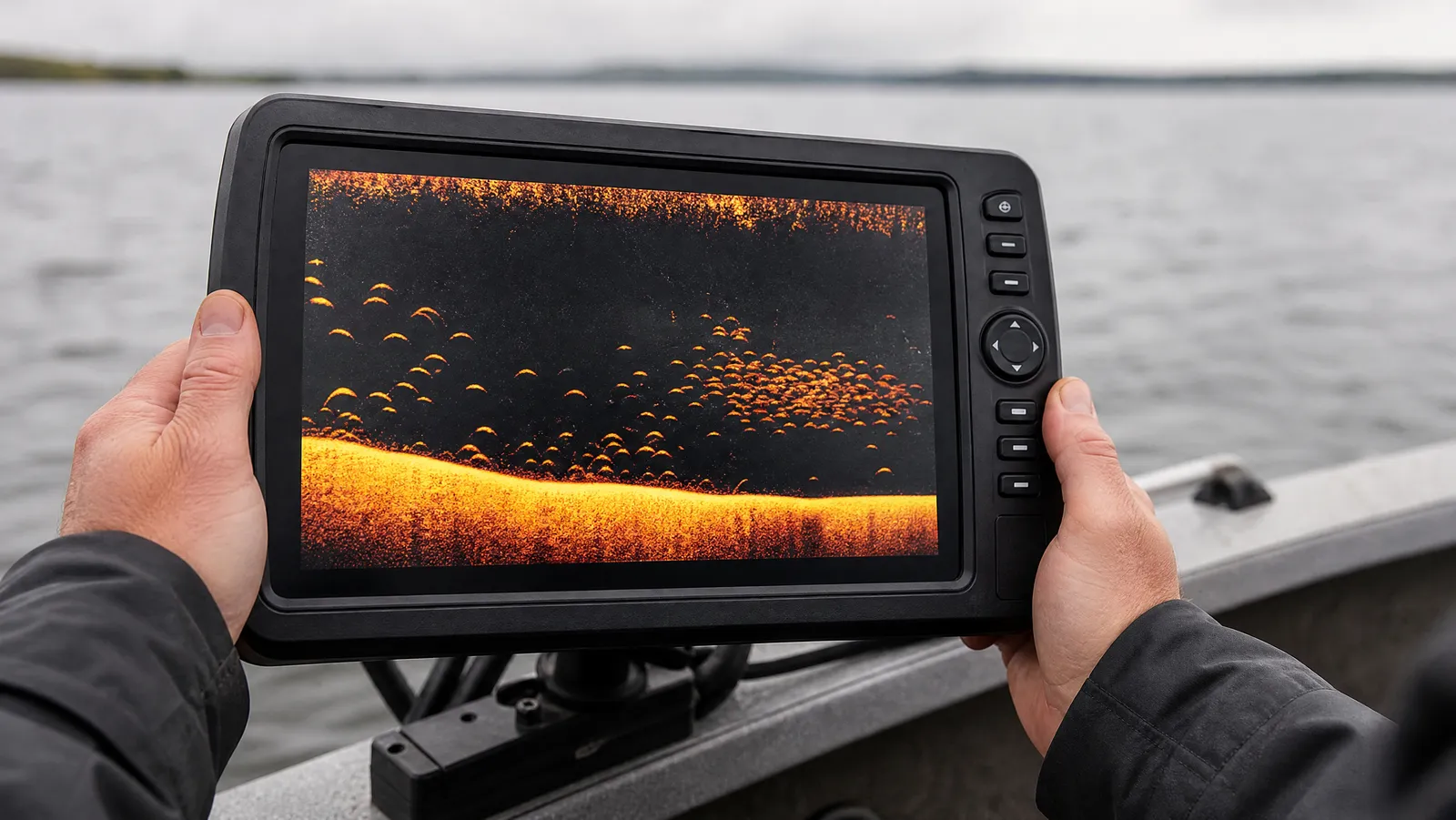
How to Read a Fish Finder: Arches, Bait Balls, and Bottom Hardness
To read a fish finder, start with one idea: the screen is a scrolling timeline, not a photograph. The column at the right edge is happening right now. Everything to the left already happened. Depth runs top to bottom. Once that clicks, arches, clouds, bands, and that faint second bottom line all start to mean something specific.
That single reframe fixes most beginner confusion. New owners look at the display and expect an underwater camera view of what is in front of the boat. What they are actually watching is a strip chart of echoes from a cone of sound aimed straight down, redrawn many times a second and pushed leftward as time passes.
Everything below is about traditional 2D sonar, the view every unit has, from an entry-level castable ball to a flagship console graph. If you are still shopping, our roundup of the best fish finders covers screens, transducers, and CHIRP. This page is about the skill that makes any of them worth owning.
Fish Finder Arches Explained: Why Fish Look Like Rainbows
A fish arch is not a picture of a fish. It is a timing artifact created by a cone-shaped beam and a moving boat.
Your transducer does not fire a laser straight down. It radiates a cone that widens with depth. Humminbird's support documentation gives the working rule of thumb for coverage: a 20-degree cone covers roughly 0.35 times the water depth, a 60-degree cone covers about 1.0 times depth, and a 90-degree cone about 2.0 times depth. In 30 feet of water, then, a 20-degree beam is looking at a circle only about 10 feet across.
Now put a fish in that cone. As Deeper explains it, when a fish passes through the sonar cone it returns pulses from the edge of the cone, then the middle, then the other edge — and the returns from the edges have traveled slightly farther than the return from the center. Farther means deeper on your screen.
So the display draws the fish deep, then shallower, then deep again. That is your arch. The peak of the arch is the moment the fish sat closest to the transducer, dead center in the cone.
Two practical consequences follow:
- Arch length means time in the beam, not fish length. A long arch is a fish that stayed under you a while, or a fish crossed slowly, or deep water where the cone is wide.
- Arch thickness and color intensity mean return strength. A thick, bright, saturated mark is a stronger echo. That is the closest thing to a size cue you get on 2D.
Why You See Half-Arches, Dashes, and Straight Lines
Perfect textbook arches are the exception, not the rule. Most real marks are partial, and each shape tells you something.
Half arches happen when a fish clips the edge of the cone instead of crossing the center — you get the entry ramp or the exit ramp, but not both. Slow, deliberate boat movement over the same fish will often complete the arch on the next pass.
Straight horizontal lines are the giveaway that nothing is moving. If your boat is anchored or spot-locked and the fish is holding still under you, the distance from transducer to fish never changes, so the screen paints a flat line at a constant depth. That line is still a fish. Many anglers vertical jigging over a school see nothing but flat lines and dashes all day.
Dots and short dashes usually mean the fish crossed quickly, or you were moving fast. Speed matters here: idle over a spot and a fish spends a second or two in the cone, plenty of pings for an arch. Run across it on plane and the same fish gets two pings and shows up as a speck.
The takeaway most people miss: arches require relative motion between the boat and the fish. Judging a spot by "I did not see arches" while sitting still is a good way to leave fish behind.
Bait Balls vs. Thermoclines: How to Tell Clouds Apart
This is the most common misread on the water, because both show up as messy horizontal stuff in the middle of the water column.
Bait looks like a cloud, a smear, or a swarm of specks with irregular edges. It has vertical thickness that changes as you move. Shad balls often show a denser core and ragged margins, and they frequently sit above or beside a hard piece of structure. Bait moves, so its shape on the screen changes from pass to pass.
A thermocline is the boundary where warm surface water meets denser cold water below, and it shows up as a flat, fuzzy, grainy horizontal band that holds the same depth no matter where you drive. That last part is the test. Motor 200 yards and look again: bait will be gone or different; the thermocline will still be sitting at 18 feet, drawing the same hazy line across the whole screen.
Three quick tiebreakers we use:
- Cross it from a second angle. Real bait shows up consistently on a second pass from a different direction but changes shape. A thermocline reads as the same flat band from every direction.
- Turn sensitivity up. A thermocline is a weak density return, and Humminbird's own support guidance for spotting one is to raise sensitivity slowly until the weaker reflection appears. Bait shows up fine at normal settings.
- Look for company. Bait balls attract arches above, below, and on their edges. A thermocline usually has fish stacked just above it in summer, not scattered through it.
Both are worth finding. Bait tells you where the fish eat. The thermocline tells you the depth below which oxygen may be scarce in a stratified lake in late summer, which quietly cuts your search area in half.
Reading Bottom Hardness From the Second Return
Look below the bottom line. On a hard bottom in reasonably shallow water, you will often see a fainter copy of the bottom drawn at exactly twice the depth — bottom at 20 feet, ghost line at 40 feet.
That is the second return, and it is not a glitch. Deeper's guidance explains the physics plainly: the sonar pulse bounces off a very hard bottom, travels back up to the water surface, reflects down again, hits the bottom a second time, and finally returns to the transducer. Only a hard bottom reflects enough energy to survive that round trip. Deeper adds that a visible second echo often means the bottom is gravel.
Soft bottom does the opposite. Mud and silt absorb sound, so there is no second return, and the primary bottom line goes thin and dull.
Two more hardness cues from the same source:
- Line thickness. A thicker bottom line generally means a harder bottom.
- Color intensity. Deeper notes that hard bottom shows in bright yellow on its palette while soft bottom reads as darker blues and reds. Every brand differs, but the principle holds: brighter and more saturated equals harder.
One setup note that changes everything: Deeper specifically recommends using the narrow or mid beam for bottom composition and warns that a wide beam is not suited to accurate bottom detection. A wide cone averages a big circle of bottom together and smears the exact rock-to-mud transition you are hunting for.
Bottom hardness is quietly the highest-value read on this entire list. Finding the seam where soft mud turns to gravel or shell has put more fish in our boats than any single arch ever has.
The Surface Clutter Band and How to Tame It
The dense noisy strip along the top of your screen is surface clutter — air bubbles, prop wash, wave action, plankton, and the transducer's own ringing. It is not fish, and it is not broken hardware.
The problem is that it hides fish holding in the top few feet, which in summer and around schooling activity is exactly where you want to see. How deep it reaches depends on the unit and conditions; Deeper, for example, states that surface clutter on its START model can extend down to about 3.3 feet below the surface, while its PRO+ 2 and CHIRP+ 2 models read accurately to within about 6 inches of the surface.
The setting that controls it is time-varying gain. Garmin's owner's manuals describe the surface clutter / TVG control as the tool for suppressing noise near the water surface while still displaying targets that would otherwise be masked by it. Nudge it, do not bury it — crank it too far and you erase the shallow fish along with the noise.
Related and separate: Garmin also documents an interference control for noise from nearby electrical sources, and advises using the lowest interference setting that achieves the improvement you want. That is the right philosophy for every filter on the unit.
Sensitivity: The One Setting Worth Learning
Sensitivity (gain) decides how weak an echo has to be before your unit stops drawing it. Auto mode is a compromise tuned to look clean, and clean screens hide fish.
How we set it manually:
- Sit over water of typical depth for the lake, not the shallowest spot at the ramp.
- Raise sensitivity until light speckle appears through the whole water column.
- Back it down just until the speckle mostly clears, and stop there.
- Reset it any time depth changes a lot. Deep clear water usually wants more gain; shallow stained water usually wants less.
Too low and small baitfish, weak thermocline returns, and fish tight to cover vanish. Too high and the screen fills with noise you cannot interpret. Most anglers we talk to run theirs too low because a sparse screen feels correct.
Stump or Fish? Reading Cover Without Fooling Yourself
Both stumps and bass can put a mark above the bottom, and both can look like a blob. The differences are reliable once you know them.
A stump, brush pile, or rock is anchored. It rises out of the bottom line and stays connected to it. Its shape does not change between passes, and its position on the screen depends only on where your boat is. Cross it three times and you get three nearly identical marks.
A fish is separated and inconsistent. Look for a gap of clean water between the mark and the bottom. Even a bass sitting hard on the bottom usually leaves a thin separation. Cross the same spot again and a fish will have moved, changed depth, or disappeared.
Other tells worth knowing:
- Timber and brush draw irregular vertical spikes with soft, fuzzy edges, and often cast a shadow of weaker bottom return behind them.
- Grass shows as a fuzzy layer growing up from the bottom with a defined top edge, not as discrete marks.
- Fish inside cover often appear as brighter, denser pixels within the fuzz. Turning sensitivity up slightly makes them separate out.
When you truly cannot tell, the honest answer is to fish it. A stump that looks like a fish still holds fish.
Fish ID Icons vs. Raw Sonar Returns
Nearly every unit ships with a feature that replaces sonar returns with cartoon fish symbols. Humminbird calls it Fish ID+; other brands use different names for the same idea.
It is a filter, not a camera. Humminbird describes Fish ID+ as a system that applies criteria to 2D sonar returns and displays a fish symbol when those conditions are met. In practice, anything suspended between the surface and the bottom that satisfies the algorithm can be drawn as a fish, and anglers routinely report symbols generated by branches, debris, and air bubbles.
That is why experienced anglers turn the icons off. The symbol throws away everything useful:
- You lose mark strength, so you cannot tell a 12-inch fish from a 5-pounder.
- You lose shape, so you cannot tell a fish from a limb.
- You lose position relative to cover, which is the information you actually fish with.
- You get false positives with no way to audit them, because the raw return that triggered the icon is hidden.
Turn Fish ID off on day one. You will mark fewer "fish" and catch more of them. It is the fastest single upgrade available to a new sonar user, and it costs nothing.
Reading Beats Spending
Here is the uncomfortable truth about fishing electronics: an angler who reads 2D sonar well on a budget unit will out-fish an angler who cannot read a flagship one. The screen shows the same physics either way. That is also why our guide to the best fish finder for the money leans toward mid-priced units — the money buys resolution and screen size, not interpretation.
Tournament rules are making the same point. B.A.S.S. announced on September 2, 2025 that forward-facing live sonar would be permitted in only up to five of the nine regular-season 2026 Elite Series events, with the qualifying events chosen at random and the rest prohibiting it entirely, including in official practice. The 2025 limits — one live sonar transducer and a maximum of 55 total screen inches — carry over. Major League Fishing went a similar direction, limiting forward-facing and 360-degree sonar on the 2026 Bass Pro Tour to one declared period per day.
Read that as a signal. When the highest levels of the sport restrict the newest technology, the durable skills are the old ones: interpreting arches, finding bait, and reading bottom composition. Those skills also transfer directly to the other views on your unit once you get there, and the trade-offs of side imaging vs down imaging are a lot easier to understand after 2D makes sense.
Practice This Before Your Next Trip
Spend 15 minutes doing nothing but looking at the screen:
- Idle a straight line across a known depth change and watch the bottom line thicken and thin. That is hardness.
- Find the second return in shallow hard-bottom water. Once you spot it at exactly double depth, you will never miss it again.
- Turn Fish ID off, then idle over bait and watch how raw returns actually behave.
- Push sensitivity up until you find the thermocline, then back it off.
- Cross one suspicious mark three times. If it never moves, it is cover.
Reading sonar is a skill, not a purchase, and it compounds. Every hour you spend interpreting returns makes the next hour faster. For a full breakdown of units, transducers, and which features are worth paying for, Angler Reviews' complete fish finder guide is the place to go next.
About The Author
Rob Thomas
Rob Thomas is a fisherman who loves catching tales from his fellow fishermen. He always enjoys a good story, especially when it comes from the sea.